Invoicing for South African small businesses

ZaberaApp sends the invoice, the reminder and the receipt. You get

Quotes your customers accept online. Invoices that go out on the day, with your logo. When someone is late, the reminder is written and waiting: check it, press Send. And one screen that shows who owes you what, to the rand.

  • Rand and VAT, set up for you
  • Works on your phone
  • We set it up with you
app.zaberaapp.co.za
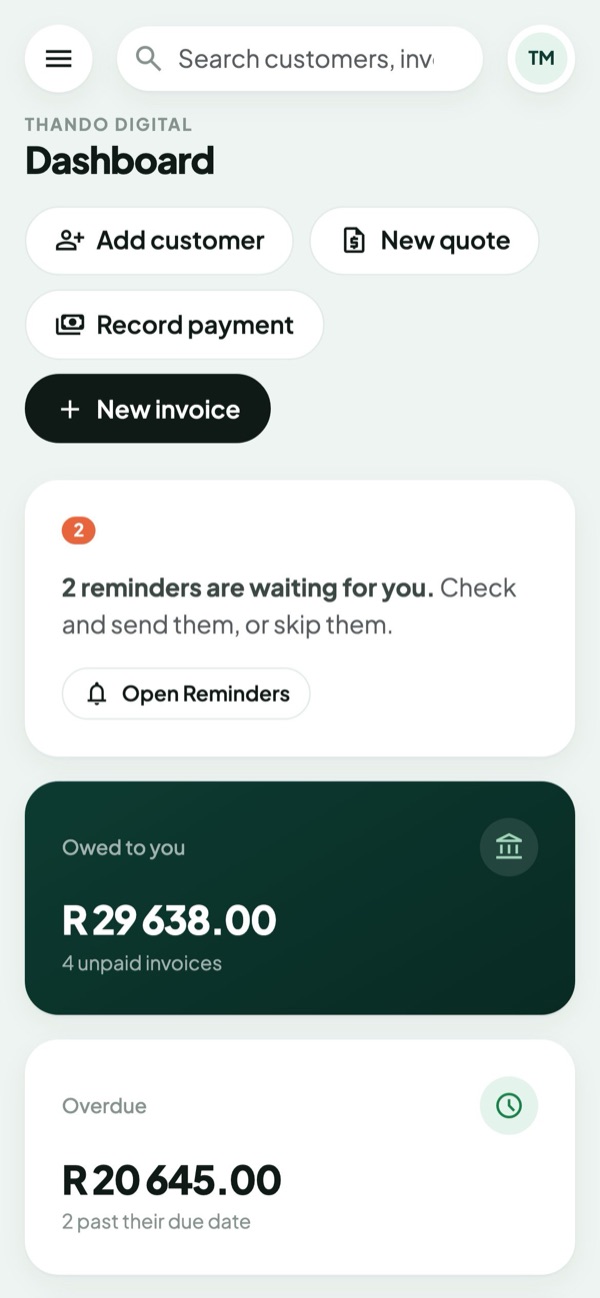
The ZaberaApp dashboard: R 29 638 owed, R 20 645 overdue, R 5 922.50 received this month, and 2 reminders waiting
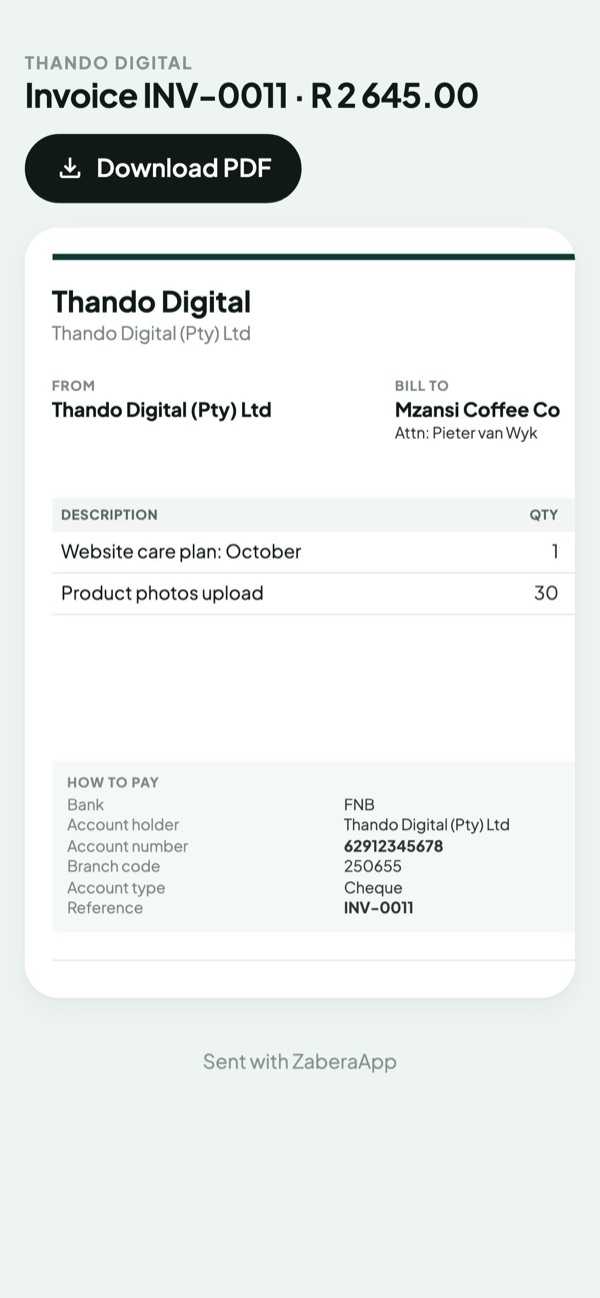
An invoice as the customer sees it on their phone, with a Download PDF button
R INV-0011 paid R 2 645.00Mzansi Coffee Co, by EFT
! Reminder sentto Kagiso at Jozi Cycle Works
How it works

Scroll through a month. Watch the money come in.

Quoted 0
Invoiced 0
Reminded 0
Paid R 0

You did one thing here: you sent two quotes. ZaberaApp turned the accepted quote into an invoice, billed six hosting customers before the 1st, had reminders ready for the two who were late (you pressed Send), and noted every payment against the right invoice.

Getting paid on time

The reminders are ready. You just say yes.

Every hour ZaberaApp checks who owes you and lines up the right email for each: a friendly nudge three days before it's due, then at 1, 7 and 14 days late. Nothing goes out until you've looked. You know who paid you yesterday; ZaberaApp doesn't, yet.

  • Send one, skip one, or send them all in one tap. Paid since? The reminder takes itself off the list.
  • "Send reminder" on any invoice, any time, to whoever you choose, with your own note.
  • Your days, your words. Choose when reminders come up and change what they say.
app.zaberaapp.co.za/reminders
Reminders3 waiting
Send all 3 emails
7 days late
Sizwe PlumbingINV-0007 · owes R 14 375.00Emails Sipho a reminder, with the invoice attached
SendSent ✓
Due in 3 days
Mzansi Coffee CoINV-0011 · owes R 2 645.00A friendly nudge before the due date
Send
Final notice
Vuka FitnessHosting: vukafitness.co.za · INV-0017Says it's suspended from 21 Nov if it isn't paid
Send
Three customers to chase, one tap each. Each line says exactly what will happen before you press Send.
For anyone billing every month

Your monthly customers bill themselves.

Hosting, retainers, rentals, tutoring, care plans: add the service to the customer once. ZaberaApp invoices each period before it starts and emails it to the right person.
  • Invoiced 7 days ahead, due on the 1st. Services that renew together share one invoice.
  • Weekly to every two years. Start mid-month and the first invoice is worked out by the day.
  • Late on a service? A final notice with a date, then suspension, then cancellation, each one waiting for your OK. Paid? It's restored straight away.
app.zaberaapp.co.za/services
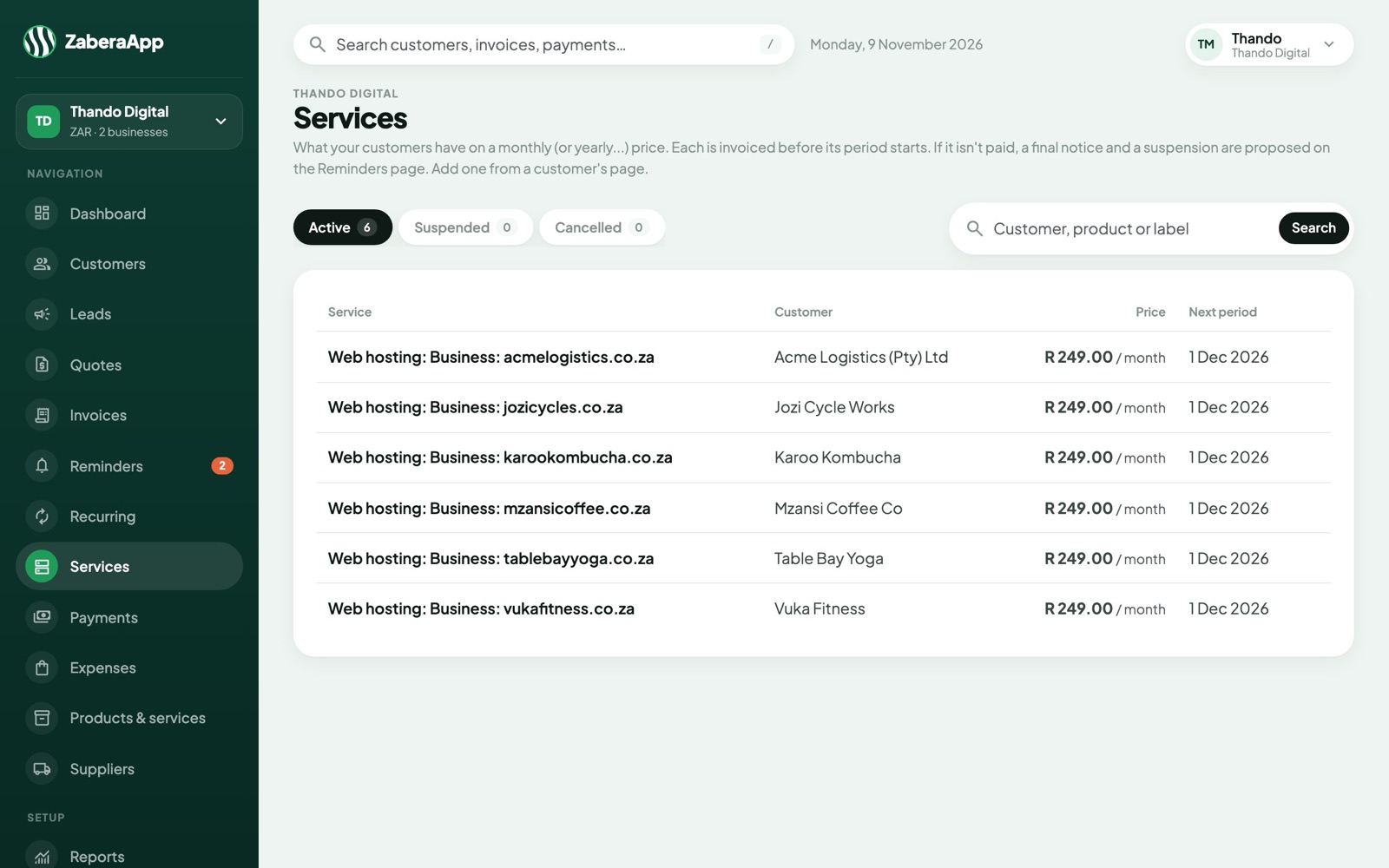
The services list: six hosting customers at R 249 a month, each renewing on 1 December
Six hosting customers, renewing on 1 December. Their invoices go out on 24 November without anyone typing one. Each line shows its domain, its price and its next period.
Who owes you

Know who owes you, how much, and for how long.

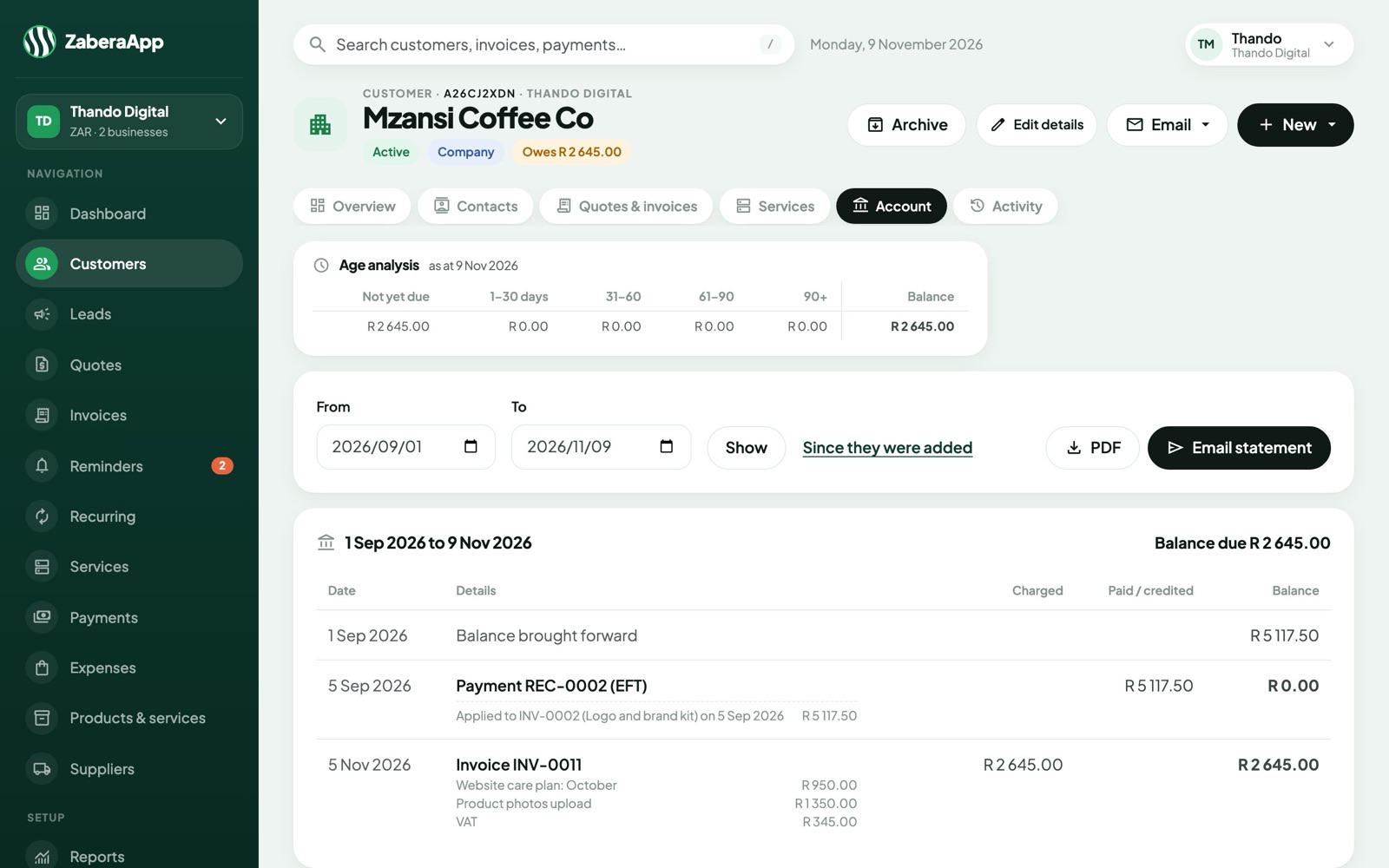
Every customer has an account, like a bank statement: what you charged, what they paid, and the balance after each line. Payments split across invoices. What's left over waits as credit and pays their next invoice.
  • An age analysis on every account: not yet due, 30, 60, 90 days and older.
  • Statements as a PDF or an email, with each line saying what it was for.
  • Credit notes and refunds that keep the account right, never a deleted invoice.
app.zaberaapp.co.za/customers/mzansi-coffee-co/statement
Mzansi Coffee Co's account: an age analysis, then every invoice and payment with what it was for and a running balance
Mzansi Coffee Co owes R 2 645.00, none of it late. Each line says what it was for, and where every payment went.
What your customer sees

An invoice that looks like you, and is easy to pay.

Your logo and colour on every quote, invoice, statement and email. Each one has a link your customer can open on any phone, with your bank details and the reference to use.
  • Quotes accepted online with one tap, and turned into an invoice with one click.
  • You see when they opened it, so "I never got it" is a short conversation.
  • A warm welcome, in your words. New customers get their account number and what to expect, and every email says it the way you would.
app.zaberaapp.co.za/view/…
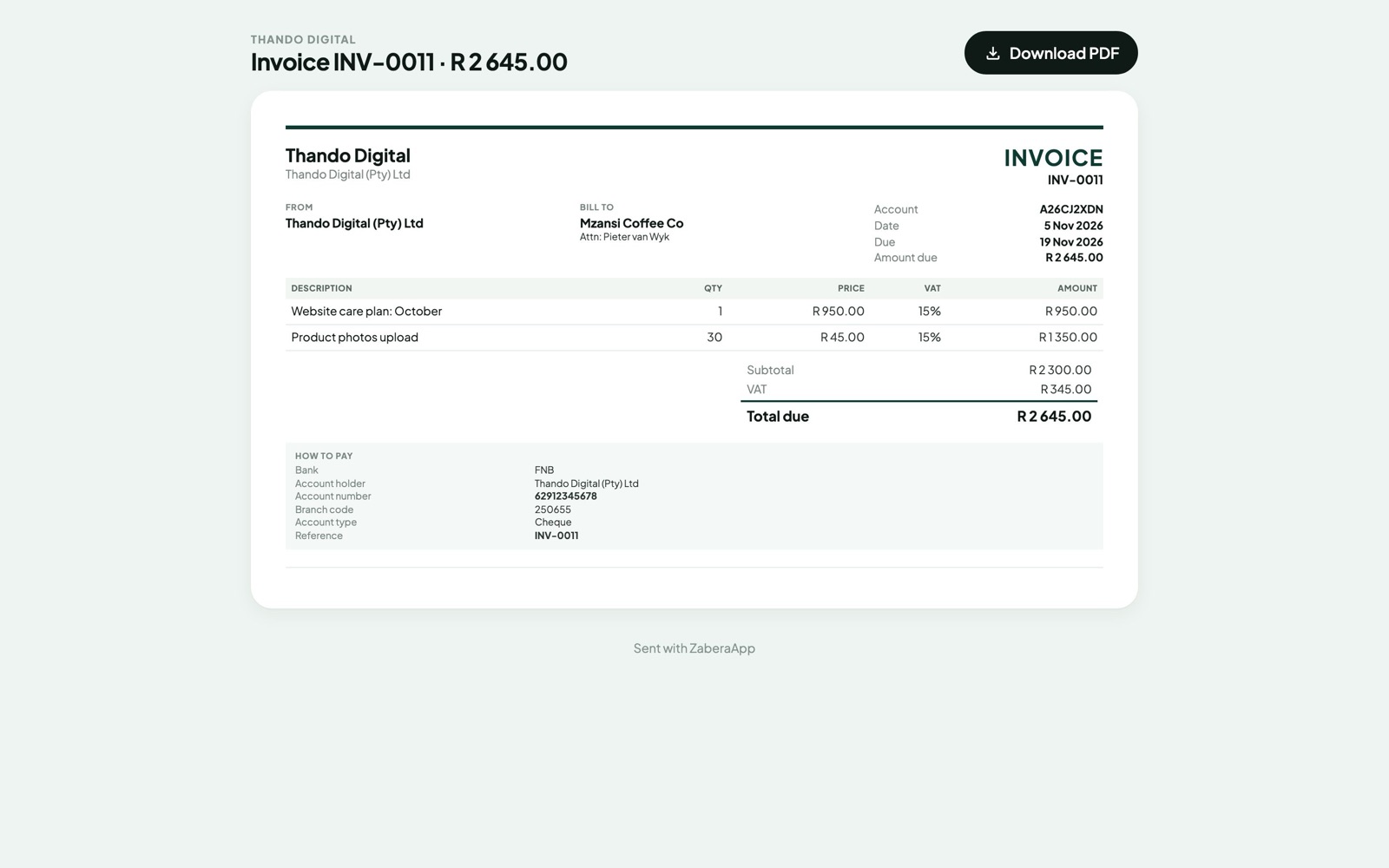
Invoice INV-0011 from Thando Digital to Mzansi Coffee Co, with a How to pay box
ZaberaApp's dashboard on a phone
INV-0011, as Mzansi Coffee Co sees it. The "How to pay" box gives them your bank details and the invoice number as the reference.
Profit and VAT

Know if you made money this month. And what to pay SARS.

Record what you spend, with a photo of the slip. ZaberaApp works out the VAT in it and puts it against your sales, so your profit and your VAT are always up to date.
  • Profit & loss on invoices sent or on money received, month by month, or against last year.
  • A VAT report for your return: VAT on sales, less VAT on expenses. To pay, or to claim back.
  • Profit by product and by customer, so you know who's worth the work.
app.zaberaapp.co.za/reports/profit-and-loss
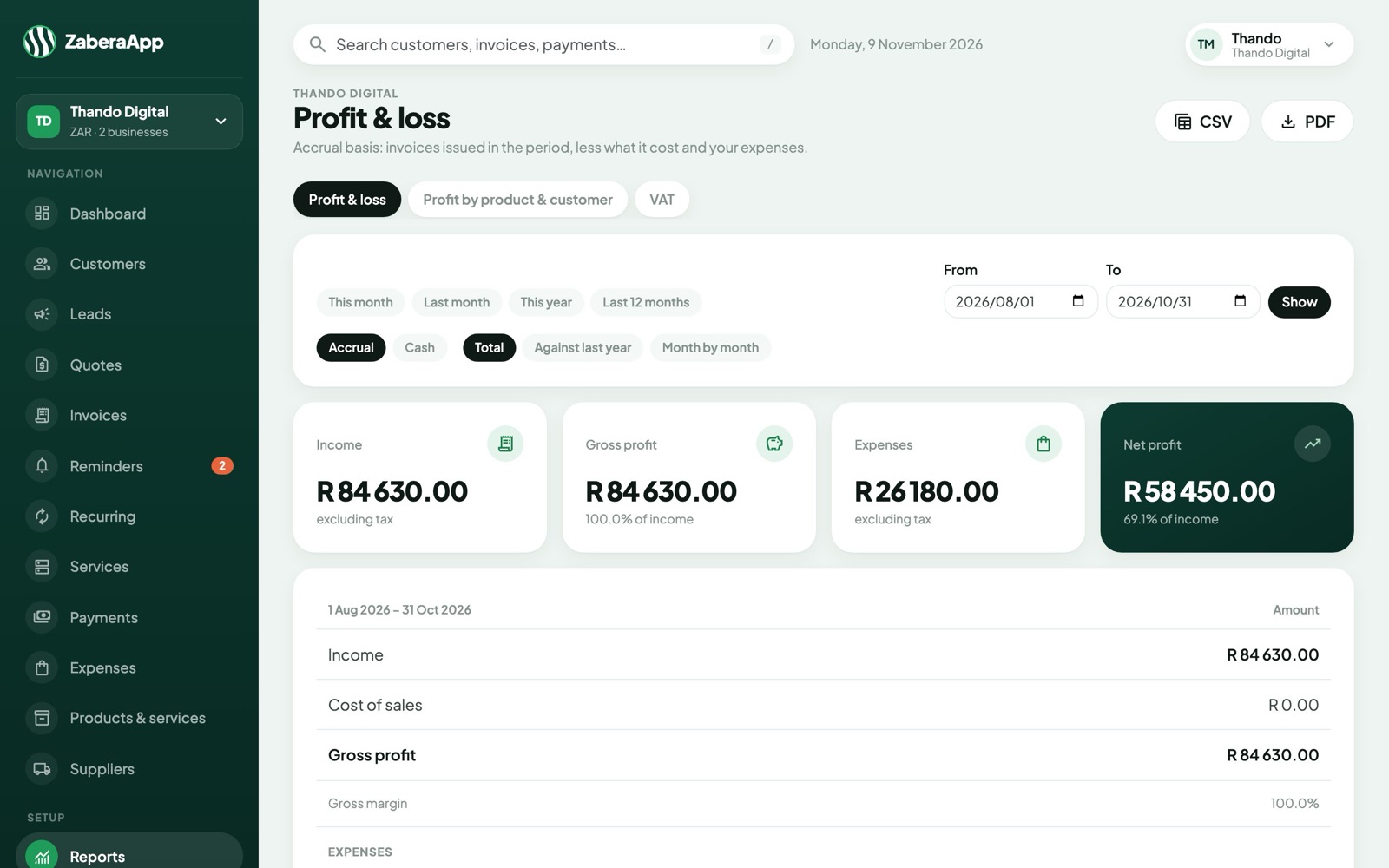
Profit and loss from August to October: R 84 630 income, R 26 180 expenses, R 58 450 net profit
Three months, R 58 450 net profit. Download it as a PDF or a spreadsheet for your accountant.
Also in the box

The small things that save the most time.

Every business, one login

Run a second business, or a third. Switch between them in a click; each keeps its own customers, numbers and branding.

Bring your customers with you

Import them from a spreadsheet. Moving from another system? Services pick up from their next renewal, with nothing billed twice.

Your team, in the right business

Invite staff to the businesses they work in. They send invoices and record payments; settings and reports stay yours.

Products made from parts

A cake, a kit, a package: list what goes into it and ZaberaApp suggests a price at the markup you want.

Find anything as you type

A customer, an invoice number, a payment reference, a phone number. Press "/" and start typing.

Invoices and expenses that repeat

The same invoice every week, month or year, sent on the day or kept as a draft to check. Rent and software repeat on your expenses too.

Suppliers, costs and margins

Note what each product costs you and who you buy it from. Every price shows its margin, and the profit report counts it.

Overpaid? It pays the next one

Money paid twice, or a credit note, waits on the account and settles their next invoice the moment it's issued. Or refund it.

Nothing goes missing

Issued invoices are never deleted, only voided or credited. Every change is written on the customer's history, with who and when.

Getting started

Your first invoice can go out today.

  1. Tell us about your business

    Answer a few quick questions. We open your account in your country, so your currency, VAT and invoice numbers are ready, and email you a link to choose your password.

  2. Add your logo and customers

    Upload your logo, pick your colour, and add customers one by one or from a spreadsheet.

  3. Send your first invoice

    Pick the products, press Send. Your customer gets an email with the PDF and a link to view it online.

Try it free

Spend Sunday night on anything but invoices.

Start with a free trial. We'll set up your business with you, and you'll send your first invoice the same day.